


Information
# Tig
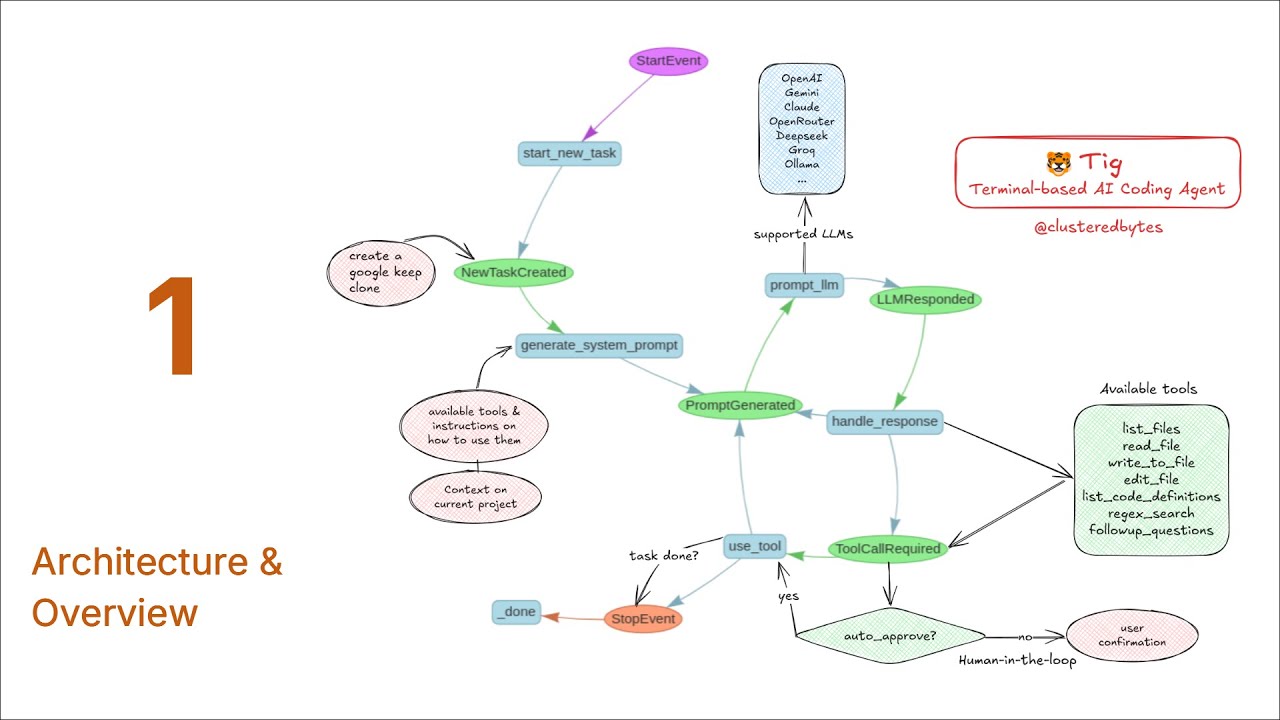
An automonous AI coding agent that runs in the terminal. Similar to Claude Code, OpenAI Codex etc. but works with many more LLMs.
It can:
- Write code
- Fix bugs
- Execute shell commands
- Write tests
- Analyze codebase and many more...
All within the terminal!
Full tutorial series on how to build it from scratch
[](https://www.youtube.com/watch?v=cgGWTjk1VLg)
### Modes
It has different modes for different tasks:
- **Architect**: Designs the system, brainstorms ideas with the user, saves the design in a markdown file.
- **Code**: Implements the architect's plan step by step
LLMs supported so far:
- Google Gemini
- OpenAI
- Claude
- OpenRouter
- Deepseek
- Groq
- Local LLMs using Ollama
## Tools Used
- **LlamaIndex Workflow**: For orchestrating and multiple LLMs support
- **Tree-sitter**: For searching code definitions (functions, classes, etc.) accross the codebase and checking for syntax errors
- **Ripgrep**: For regex search accross the codebase
- **Google's diff-match-patch**: For comparing and displaying diffs
## Requirements
Tig depends on some external tools:
- **Ripgrep**: For regex search accross the codebase
Make sure to install it for your operating system.
For macOS, you can use Homebrew:
\`\`\`bash
brew install ripgrep
\`\`\`
For Linux, you can use the package manager for your distro:
For Arch:
\`\`\`bash
sudo pacman -S ripgrep
\`\`\`
For Fedora:
\`\`\`bash
sudo dnf install ripgrep
\`\`\`
## Installation (using pip)
Install Tig using pip:
\`\`\`bash
pip install tig-code
\`\`\`
Note: If \`tig\` is not in your PATH, you need to add it first (depends on your python installation)
## Usage
Tig is configured using \`.env\` file.
Specify the LLM and model to use alongside with appropriate API keys in the \`.env\` file.
\`\`\`bash
GOOGLE_API_KEY="..."
TIG_MODEL="gemini-2.0-flash"
TIG_PROVIDER="google" # available providers: [google, openai, anthropic, deepseek, groq, ollama, openrouter]
\`\`\`
Provide the right API key variable for the right model e.g. \`GOOGLE_API_KEY\` for Gemini, \`OPENAI_API_KEY\` for OpenAI, \`ANTHROPIC_API_KEY\` for Claude, etc.
Now run tig (optionally specify the mode \`--mode \`):
\`\`\`bash
tig
\`\`\`
If you want to auto-approve all the actions taken by Tig (read, write, update files), run \`tig\` with the \`--auto-approve\` flag:
\`\`\`bash
tig --auto-approve
\`\`\`
Finally when prompted, provide tig with a task to get started:
\`\`\`txt
...
New task: Create a screen recorder website for chrome
...
\`\`\`